Best Meeting Room Booking System Singapore: Complete Guide to Smart Office Solutions

Meeting room chaos costs Singapore businesses time and money. Double bookings, abandoned reservations and manual room coordination reduce productivity and frustrate staff.
A professional meeting room booking system removes these frictions. Modern room booking platforms give instant visibility of availability, enforce booking rules and integrate with your existing calendar workflow so teams spend less time managing meetings and more time doing productive work.
I-Weblogic brings 20 years of hardware expertise to office deployments across Singapore. We specialise in professional installation of Evoko smart office panels and provide end-to-end support to integrate the panels with your calendar systems.
This guide explains the features, implementation best practices and procurement considerations that matter to Singapore organisations. The Evoko section below is tailored to our typical setup: bookings are managed through Microsoft 365 and Outlook, and Evoko Liso panels sync with your email server to display live room status.
Transform Your Meeting Room Management Today
Speak with our expert team about implementing a professional booking solution. Get a free consultation on Evoko smart panels tailored to your Singapore office.
WhatsApp: +65 87827613Email Our Team
Understanding Meeting Room Booking Systems in Singapore Workplaces

Room booking systems streamline how organisations manage meeting space. They combine visible display hardware with a software platform that orchestrates reservations and synchronises with corporate calendars such as Microsoft Outlook or Google Workspace.
The practical benefit is straightforward: staff stop wasting time hunting for available rooms or turning up to booked but unused spaces. Clear availability indicators and enforced booking rules reduce conflicts and make the workplace more efficient.
Modern solutions provide real-time visibility across your workspace. Employees can book meeting rooms and desks from their desktops or mobile devices. Managers receive analytics to understand utilisation and make data-driven space decisions.
Core Components of Effective Room Booking Solutions
Delivering a reliable meeting room experience requires several coordinated elements. Display hardware presents current status at the door. A cloud or on‑premise software platform manages reservations and policy enforcement. Calendar integration ties everything into your existing workflow.
Display Hardware
Smart panels mount outside each room to show live booking status. Clear LED indicators and a responsive touchscreen make ad‑hoc booking simple and fast.
- Red/green LED status indicators for instant recognition
- Touchscreen interfaces for on-the-spot booking
- Professional design that complements office aesthetics
- Durable construction suitable for continuous business use
Software Platform
The software platform administers reservations, user permissions and reporting. It synchronises with your calendar system so bookings made in Outlook or Google Calendar appear on the panel immediately.
- Real-time synchronization with Office 365 and Google Workspace
- Mobile apps and web portals for booking on the go
- Analytics dashboards for space optimisation
- Role-based access and administrative controls
Integration Layer
Integration with existing workplace tools ensures user adoption. The system operates inside familiar calendars and collaboration platforms, removing the need for new habits.
- Microsoft Outlook calendar sync
- Google Workspace integration
- Microsoft Teams compatibility
- API access for custom integrations
Management Features
Administrative features provide the controls facilities teams need: booking policies, reporting and automated rules that handle common scenarios such as no-shows.
- Booking policy enforcement (advance limits, duration caps)
- Space utilisation analytics and reporting
- Automatic release of bookings based on check-in rules or calendar policies
- Resource scheduling and management

Common Meeting Room Challenges Singapore Businesses Face

Singapore workplaces frequently encounter meeting room problems that drain productivity and morale. These operational frictions — from double bookings to ghost reservations — cost staff time and create avoidable disruption.
Double Bookings and Room Conflicts
Multiple teams sometimes reserve the same room at the same time, especially where calendar resources are misconfigured or users don’t add the room correctly. The result: employees arrive to find their reserved meeting room occupied, meetings are delayed and staff scramble for alternatives.
For organisations, this means lost time, stressed teams and poorer client impressions. A reliable room booking process and proper calendar configuration remove most of these conflicts.
Room Poaching and Abandoned Reservations
When employees reserve rooms “just in case” or leave reservations unused, valuable meeting space sits idle while others need it. These ghost bookings reduce effective room usage and skew space utilisation metrics.
Practical policies and automated calendar rules — for example, short check-in windows or automatic release configured in Exchange / Microsoft 365 — help reclaim unused time slots without requiring occupancy sensors.
Inefficient Space Management
Facilities teams often lack clear visibility of how rooms are actually used. Large rooms may be booked for small meetings, while better‑suited spaces remain underused. Without accurate analytics, organisations risk costly, unnecessary changes to their real estate footprint.
Accurate reporting from a unified room booking system enables right‑sizing of meeting rooms and more effective space planning.
Manual Booking Inefficiencies
Relying on manual calendar invites alone creates friction: employees check multiple calendars, walk between floors, and spend time resolving conflicts. Manual workflows also make it hard to enforce booking rules or track no‑shows consistently.
Poor Visitor Experience
Guests and new staff can struggle to find available rooms without clear signage or status indicators. Interruptions to ongoing meetings and visible disorganisation harm professional perception — a particular risk in client-facing Singapore offices.
Ready to Eliminate Meeting Room Chaos?
I-Weblogic’s expert team can assess your current challenges and recommend the perfect solution. Get a free consultation on implementing smart room booking technology.
Key Benefits of Implementing Smart Meeting Room Booking Solutions

Professional room booking systems deliver measurable improvements for Singapore organisations. By removing manual friction and synchronising bookings across calendars, companies see faster meeting starts, better space utilisation and reduced administrative overhead.
Eliminate Double Bookings Permanently
When the booking platform synchronises in real time with your calendar system, conflicts are avoided. Staff book meeting rooms the same way they create meetings — by adding the room resource in Outlook or Google Calendar — and the system prevents overlapping reservations.
The result is predictable meeting schedules, fewer delays and less time spent finding alternative rooms.
Professional LED Status Indicators
Clear red/green LED indicators on room panels give immediate at-a-glance availability across the floor. Employees can spot available rooms without walking to the door.
This visual clarity reduces wasted time and makes the workplace easier to navigate.
- Green light indicates room availability for immediate booking
- Red light shows occupied status during scheduled meetings
- Amber warnings alert when meeting time approaches end
- Visual clarity reduces workplace navigation time significantly
- Professional appearance enhances office aesthetics
Seamless Calendar Integration
The most effective room booking solutions work within existing workflows. Employees continue to use Microsoft Outlook or Google Workspace; rooms appear as calendar resources and are reserved by adding them to meeting invitations.
Evoko Liso panels (as deployed by I-Weblogic) synchronise with Microsoft 365 / Exchange so the panel shows live Red/Green status based on calendar bookings. Panels also support on-panel ad-hoc bookings for immediate needs.

Microsoft Office 365 Compatibility
Organisations using Microsoft 365 gain native compatibility: rooms are created as bookable resources in Exchange and appear in Outlook. Proper configuration of room mailboxes and permissions ensures reliable sync and booking behaviour.
Microsoft Teams scheduling integrates with the same resource model so hybrid meetings and video equipment can be coordinated with room reservations.
Google Workspace Support
Google Calendar users receive equivalent functionality. Rooms set up as calendar resources appear in invites and sync with supported display panels.
Improved Space Utilization
Analytics dashboards convert booking data into actionable insight. Facilities managers identify underutilised rooms, peak demand times and opportunities to right‑size the meeting room portfolio.
Data-driven decisions reduce unnecessary real estate costs and improve overall space management.
| Benefit Category | Impact | Measurable Result (Indicative) |
| Time Savings | Eliminate room search time | 15–20 minutes saved per employee per week |
| Productivity Increase | Meetings start on time | Up to 95% reduction in delayed starts |
| Space Optimization | Improve room utilization | 30–40% increase in effective usage |
| Cost Reduction | Optimize real estate needs | Potential 10–15% space requirement reduction |
| Employee Satisfaction | Reduce booking frustration | Notable improvement in workplace surveys |
| Professional Image | Enhance visitor experience | Improved client perception scores |
Enhanced Workplace Experience
A unified room booking system reduces frustration and simplifies the booking process for employees. New staff onboard faster and visitors find meetings with confidence — a small change that strengthens professional perception.
To book a room in Microsoft 365 simply add the room resource as an attendee in your Outlook invite; alternatively, use the Evoko Liso touchscreen for quick ad‑hoc bookings. For detailed deployment steps, see our Evoko section below.
Evoko: Leading Meeting Room Booking System for Singapore Offices

Evoko provides enterprise-grade room booking products designed for modern offices. Its smart panels combine refined hardware with a management platform that makes booking meeting rooms simple and reliable for Singapore organisations.
The Swedish company is known for intuitive, durable displays that integrate with existing IT infrastructure. I-Weblogic specialises in professional Evoko installation and ongoing support across Singapore, ensuring the solution operates smoothly within your environment.
Evoko Liso: Premium Room Booking Display
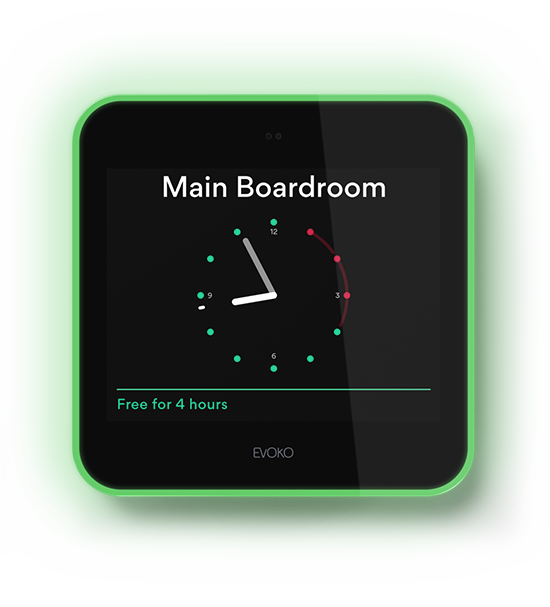
The Evoko Liso is the flagship room booking panel typically mounted outside conference rooms. Its touchscreen offers straightforward on-screen controls for scheduled and ad‑hoc bookings, while the LED ring provides clear availability status at a glance.
LED indicators show room status from a distance: green for available, red for occupied and amber as a warning when a meeting is nearing its end. The Liso is built for continuous office use and supports Power over Ethernet for simplified installation.
Evoko Liso Advantages
- High-clarity touchscreen for easy on‑panel booking
- Bright LED status indicators visible across floors
- Native synchronization with Microsoft Exchange (Office 365) and Google Calendar
- On-screen booking with meeting details and extensions
- Configurable automatic release based on calendar check-in rules
- Clean Scandinavian design that complements office interiors
- PoE (Power over Ethernet) for simple cabling
- Multi-language support
- Customisable display themes and branding
Considerations
- Premium pricing compared with basic solutions
- Requires careful network and calendar configuration
- Professional installation recommended for optimal results
- Initial setup requires IT coordination with Microsoft 365 or Google Workspace administrators
Optional Sensor Solutions (Not Used in This Setup)
Evoko offers optional occupancy-sensor products as an add‑on for organisations that wish to verify physical presence. Important: for the installations and deployments covered by this guide and by I‑Weblogic’s standard Singapore setup, we do not install or rely on Naso sensors. Automatic release and no‑show handling in our delivered configuration are implemented via calendar check‑in rules and server-side policies rather than motion sensing.
Key Evoko Features for Singapore Workplaces
Evoko systems include features that support enterprise room booking needs. The platform handles complex booking scenarios while keeping the user experience familiar to staff.
- Real-time calendar synchronization with Office 365 and Google Workspace
- Mobile and on-panel booking for quick ad‑hoc meetings
- Web-based administrative dashboard for facility managers
- Interactive floor plans showing all room availability
- Detailed analytics on room and space utilisation
- Configurable check-in rules to prevent ghost bookings (server/calendar-driven)
- Meeting extension and on-panel controls
- Integration with Microsoft Teams for hybrid meetings
- Support for hot desking and flexible workspace booking when required
- Customisable booking policies and time restrictions
How Booking Works in Our Microsoft 365 Setup
In the standard I‑Weblogic deployment for Singapore offices, booking is handled entirely through Microsoft 365 / Outlook or Google Calendar. Typical user workflows are:
- Book via Outlook: create a meeting and add the room resource as an attendee (the room appears in the global address list). The reservation is accepted by Exchange and synchronises to the Evoko Liso panel, which shows the room as occupied.
- Book on the panel: for immediate ad‑hoc meetings, users can tap the Liso screen and choose “Book now” or select a short time slot; the panel writes the reservation back to the calendar server so bookings remain authoritative.
Because the Liso syncs with your email/calendar server (Exchange / Microsoft 365), Red/Green room status reflects the live calendar state. Organisations may also configure short check‑in windows (for example, require check‑in within 10 minutes) so unused bookings are automatically released by calendar policy rather than by motion sensors.
Installation and Integration Process
I‑Weblogic manages complete deployment for Evoko panels. Our process covers site assessment, calendar configuration and professional installation to ensure each panel communicates reliably with your Exchange or Google calendar environment.
Site Assessment
We review your office layout, preferred panel locations and network readiness. We identify optimal placement for visibility and accessibility and confirm PoE availability where possible.
We also coordinate with your Microsoft 365 administrators to create room resources and the required service accounts.
Professional Installation
Certified technicians install panels at recommended heights, configure network settings and verify calendar synchronization for each meeting room. We test on-panel booking, check-in rules and admin reporting during commissioning.
Training for administrators and end users is provided as part of the handover.
Get Expert Evoko Installation in Singapore
I-Weblogic brings 20 years of hardware expertise to your Evoko deployment. Our professional team ensures flawless installation and integration. Contact us for a customized quote.
WhatsApp: +65 87827613Email: info@i-weblogic.com
Seamless Calendar Integration: Office 365 and Google Workspace

Successful room booking solutions integrate directly with the calendar tools your teams already use. In Singapore, most organisations rely on Microsoft Office 365 or Google Workspace; the booking platform should appear and behave like a native calendar resource so users do not need to change how they work.
Microsoft Office 365 and Exchange Integration
For organisations using Microsoft 365, Exchange provides the most robust model for room resources. Rooms are created as calendar resources (room mailboxes) that appear in Outlook; users book by adding the room as an attendee or resource in the meeting invitation.
When configured correctly, bookings synchronise bidirectionally in real time: a reservation made in Outlook updates the room panel instantly and vice versa for on-panel bookings. Evoko Liso panels deployed by I‑Weblogic sync with your Exchange/Office 365 server so the panel displays live Red/Green status based on the authoritative calendar state.
Exchange Server Benefits
- Native resource scheduling and mailbox-based room accounts
- Automatic conflict detection and policy enforcement
- Meeting invitation workflow integration via Outlook
- Live free/busy status and immediate sync to panels
- Global Address List inclusion for easy room selection
- Outlook mobile app compatibility for bookings on the move
Microsoft Teams Integration
- Create Teams meetings together with room bookings
- Support for hybrid meetings and coordinated video equipment
- One-click join capabilities and presence synchronization
- Works with Teams-certified room hardware where required
Google Workspace Calendar Synchronization
Google Calendar supports room resources in a similar way. Rooms appear in the calendar invite list and reservations propagate through Google’s API. Where organisations use Google Workspace, Evoko panels can be synchronised to show the same live status as Outlook-based deployments.
Workspace administrators create room resources in the admin console and grant booking permissions to staff; panels then connect via API credentials to reflect calendar state.
Cross-Platform Compatibility
Some organisations run both Microsoft and Google environments. Evoko supports hybrid scenarios so rooms remain synchronised and managers retain a single view of bookings. Centralised dashboards aggregate data from multiple calendar sources for consolidated reporting.
Calendar Integration Best Practices (Practical Steps)
I‑Weblogic follows proven steps to ensure calendar integration is reliable and secure. Key recommendations for Microsoft 365 deployments:
- Administrative access to Exchange Online or Google Workspace admin console
- Create dedicated room resource accounts (room mailboxes) for each meeting room
- Provision a service account or application identity for panel synchronization
- Register each room as a calendar resource and set booking permissions
- Configure application permissions (Microsoft Graph API) or Google API access for reliable sync
- Set automatic acceptance or check‑in rules to manage no‑shows (server-side policy)
- Test bidirectional updates thoroughly (Outlook ↔ panel ↔ admin dashboard)
- Monitor synchronization logs and service account health regularly
- Update room details and policies as organisational needs change
- Maintain current software/firmware and review integration permissions annually
Practical user example: to book rooms in Outlook, create a meeting and add the room resource as an attendee (or select it from the room finder). The booking is registered in Exchange and the Evoko Liso panel will display occupied status immediately. To book ad‑hoc, tap “Book now” on the Liso screen — the panel writes the reservation back to the calendar server so bookings remain authoritative.
I‑Weblogic configures these elements during deployment to ensure your room booking experience is consistent, secure and aligned with organisational policies.
Desk Booking and Hot Desking Solutions for Flexible Workspaces

Flexible working is now standard in many Singapore offices. Desk booking systems let organisations manage desks and meeting rooms from a single platform so employees can reserve the workspace they need when they come into the office.
The Rise of Flexible Workspace Management
Hybrid working patterns create variable occupancy across days. Desk booking enables organisations to reduce fixed seating, optimise space and provide staff with reliable ways to reserve desks near colleagues for collaboration.
Users book desks or meeting rooms via the same calendar workflow used for meetings (for example, using Microsoft 365 / Outlook) or through a unified booking app or web portal.
Desk Booking Platform Features
Modern desk booking solutions offer a consistent experience across desks and rooms so users interact with one system for all bookings.
- Interactive floor plans showing available desks and meeting rooms in real time
- Mobile apps and web portals for advance desk reservation
- Proximity-based desk suggestions to sit near teammates
- Filters for equipment and amenities (monitors, phone, quiet zones)
- Configurable check-in requirements and calendar-driven auto-release to free unused bookings
- Integration with access control and workplace systems where required
- Analytics on desk and room utilisation to inform space planning
- Support for neighbourhoods/zones to help teams cluster
Managing Desks and Rooms Through a Unified Platform
Consolidating desk booking and meeting room management on one platform reduces admin overhead and provides a single source of truth for space usage. Facility managers gain cross‑resource analytics to optimise layouts and reduce real estate costs.

Unified Workspace Benefits
Single sign-on and a common booking interface simplify use for employees. Reporting consolidates desks and rooms so managers see total space utilisation and make data-driven decisions.
Implementing Desk Booking in Singapore Offices
Start with a pilot: choose one floor or department and roll out desk booking for a limited group for 4–6 weeks. Use the pilot to refine policies, signage and communications before a full rollout.
Practical adoption steps include clear instructions on how to book desks and rooms (book via Outlook by adding the room resource or via the booking portal), visible signage, and short training sessions for users.
Hot Desking Best Practices
Provide lockers for personal storage, offer a range of workspace types, ensure ample power and connectivity, maintain cleaning protocols, create quiet zones and collaboration areas, and set clear booking time limits. Communicate policies clearly and use analytics to iterate.
Space Management and Utilization Analytics for Smart Offices

Good analytics turn room booking from an operational chore into a strategic asset. Meeting room booking platforms generate actionable data that helps Singapore organisations optimise space, reduce costs and improve employee experience.
Understanding Workspace Utilization Metrics
Modern platforms collect comprehensive booking and occupancy data. For deployments that do not use occupancy sensors, actual occupancy is inferred from calendar bookings, check‑in events and on‑panel interactions rather than motion sensors.
Key metrics to monitor include booking rate, no‑show rate, average meeting duration, peak usage times and space efficiency. These indicators reveal which rooms are overbooked, underused or poorly matched to typical meeting sizes.
| Metric Category | What It Measures | Strategic Value |
| Booking Rate | Percentage of time slots reserved | Identifies high-demand rooms and optimal capacity |
| Actual Occupancy | Calendar-verified occupancy and check-in data | Reveals ghost bookings and true space needs without requiring sensors |
| No-Show Rate | Booked but unused meetings | Quantifies wasted capacity for policy adjustment |
| Average Meeting Duration | Typical meeting length by room | Helps right-size meeting spaces |
| Peak Usage Times | When rooms experience highest demand | Informs capacity planning and expansion |
| Space Efficiency | Utilisation per square metre | Calculates ROI on real estate investment |
Analytics Dashboard Capabilities
Professional room booking platforms provide dashboards and reports that make it easy for facilities and workplace teams to act. Typical features include heat maps, utilisation trends, custom report builders and exportable datasets for executive review.
Examples of useful reports: daily top-used rooms, rooms with highest no‑show rates, hourly demand heat maps, and cost‑per‑use summaries. These views help justify consolidation or reconfiguration of meeting rooms and desks.
- Real-time status and historical trends by room, floor and building
- Heat maps showing demand concentrations across spaces
- Comparative analysis between different room types
- Behavioural insights (booking patterns, frequent bookers)
- Cost-per-use calculations to inform real estate decisions
- Capacity planning forecasts based on trend analysis
- Automated scheduled reports for stakeholders
- Data export for C-level reporting and financial modelling

Data-Driven Space Optimization Strategies
Use analytics to test hypotheses and run low-risk changes. Typical optimisation actions include resizing rooms, adding huddle spaces, repurposing seldom-used rooms and refining booking policies to match real demand.
Common Optimization Opportunities
- Convert large underused rooms into multiple smaller spaces
- Create huddle rooms for frequent short meetings
- Repurpose low-demand areas for other workplace functions
- Adjust booking rules (advance booking limits, check-in windows) based on usage
- Enable calendar-driven auto-release to reclaim unused bookings
ROI Measurement
- Calculate direct cost savings from reduced real estate needs
- Measure productivity gains from fewer conflicts and faster meeting starts
- Quantify time saved through efficient booking and reduced room search
- Assess long-term real estate cost optimisation potential
- Track employee satisfaction improvements tied to better room availability
Privacy and Data Governance
Analytics must respect privacy and comply with Singapore’s Personal Data Protection Act. Use role-based access, anonymise personal identifiers in reports where possible and publish a clear policy about what data is collected and how it is used.
Checklist for PDPA-aware analytics:
- Define the minimal data needed for insights
- Anonymise or pseudonymise personal data in aggregated reports
- Restrict access to raw logs and sensitive information
- Document retention periods and deletion policies
- Communicate analytics practices to employees to build trust
For organisations uncertain about the best approach, we recommend a short pilot analytics review: gather 4–8 weeks of booking data, validate reports against observed usage and then iterate policies. Contact I‑Weblogic for a pilot assessment and support.
Complete Implementation Guide for Singapore Organizations

Successful room booking system implementation requires careful planning and clear stakeholder coordination. Singapore organisations benefit from a phased approach that aligns IT, facilities and business owners to deliver a reliable solution with minimal disruption.
Phase 1: Assessment and Planning
Start with a thorough needs assessment to document current pain points and define targets for the deployment. Early engagement with stakeholders ensures the chosen solution meets operational and technical requirements. Conduct a facility audit of all meeting rooms and desksSurvey employees about current booking and utilisation frustrationsIdentify stakeholders across IT, facilities, procurement and business unitsDocument existing calendar infrastructure (Office 365 / Exchange or Google Workspace)Define success criteria, KPIs and measurement metricsEstablish project budget, timeline and governanceAssemble the implementation team with clear responsibilities 
Phase 2: System Selection and Procurement
Choose a platform that aligns with your calendar environment, scale and reporting needs. Evoko is an enterprise‑grade option that integrates with Microsoft 365 and Google Workspace; I‑Weblogic can help evaluate total cost of ownership and feature fit.
Consider future growth and supportability when making procurement decisions.
Evaluation Criteria
- Compatibility with your calendar platform (Office 365 / Exchange or Google Workspace)
- Hardware quality, warranty and lifecycle expectations
- Software features, analytics and customisation options
- Mobile app and on-panel user experience
- Vendor support, SLAs and local Singapore-based assistance
- Total cost of ownership, licensing and recurring fees
Procurement Considerations
- Number of panels required for all meeting rooms and key spaces
- Optional occupancy sensors for organisations that require verified presence (note: sensors are not included in I‑Weblogic’s standard deployments unless specifically requested)
- Network infrastructure needs (PoE switches, cabling and VLAN planning)
- Software licensing models and long-term costs
- Professional installation and configuration services
- Training requirements for administrators and end users
- Ongoing maintenance, support contracts and spare equipment planning
Phase 3: Infrastructure Preparation
Ensure the technical foundation supports reliable panel connectivity and secure calendar integration. Coordinate with IT to provision service accounts and network pathways before hardware arrives.
Key tasks include verifying PoE availability, firewall and proxy rules for cloud access, and creating room resource mailboxes or calendar resources in Microsoft 365 / Google Workspace.
Phase 4: Installation and Configuration
Professional installation delivers consistent results. I‑Weblogic technicians mount panels, configure network settings and verify calendar synchronization for each room.
Each panel is assigned to a room resource and tested for bidirectional updates so bookings from Outlook or the panel remain authoritative.
Installation Best Practices
Mount panels at approximately 150cm height for accessibility. Position displays with clear sightlines and avoid glare. Verify network connectivity and PoE power before final mounting. Test touchscreen responsiveness, LED visibility and calendar sync for each room. Apply neat cable management for a professional finish.
Phase 5: Training and Change Management
User adoption is the most important success factor. Provide role-based training and clear communications to encourage correct booking behaviour.
Suggested training and rollout activities: Create quick reference guides showing how to book rooms via Outlook (add the room resource as an attendee) and how to use on-panel bookingProduce short video tutorials for staff and administratorsRun live training sessions for key users and facilities staffEstablish a helpdesk contact and escalation path for early issuesSend regular tips and reminders during the initial rollout phaseCollect feedback and iterate booking policies based on real usageRecognise early adopters and champions who model good behaviour
Phase 6: Launch and Optimization
Use a phased pilot to reduce risk: deploy 4–6 rooms on one floor or within a single department for 2–4 weeks, gather usage data and user feedback, then refine configuration before full rollout.
Monitor analytics closely during the first 30–90 days to identify configuration tweaks, policy adjustments and training gaps. Optimise check‑in rules, booking limits and reporting to match organisational behaviour.
Professional Implementation Support Available
I-Weblogic manages complete end-to-end implementation for Singapore organisations. Our 20 years of hardware expertise ensures flawless deployment. Contact us to discuss your project timeline and requirements.
WhatsApp: +65 87827613Email: info@i-weblogic.com
Integration with Teams, Zoom, and Workplace Management Platforms

Modern room booking solutions form part of a broader workplace ecosystem. Integration with conferencing tools and workplace platforms streamlines booking, joining and managing meetings so users enjoy a consistent experience across systems.
Microsoft Teams Room Integration
When integrated with Microsoft 365, room bookings can be linked to Teams meetings. The typical flow is: create a Teams meeting in Outlook and add the room resource; the room reservation and the Teams meeting coexist in the calendar, making one-click join and coordinated scheduling straightforward.
Note: responsibility for enabling Teams-related features usually sits with the Microsoft 365 administrator — I‑Weblogic configures the room resources and coordinates Teams/room hardware integration as required.
- Create Teams meetings and add room resources in Outlook
- One-click join from meeting invites where room systems are configured
- Coordinate Teams-certified room hardware and scheduling where required

Zoom Rooms and Video Conferencing
For organisations using Zoom, room bookings can be associated with Zoom meetings so meeting IDs and join information are available to attendees. I‑Weblogic can help map your room resources to Zoom Rooms or other conferencing endpoints as part of the integration work.
Automatic activation of in-room equipment depends on the specific room hardware and certification; I‑Weblogic will validate capabilities during the site assessment.
Workplace Management Platform Connectivity
Larger organisations often connect room booking with building systems such as access control, visitor management and facilities workflows. Integrating these platforms delivers a unified workplace experience and centralised reporting.

Common Platform Integrations
- Building access control and presence systems
- Visitor management and reception workflows
- Employee directory and organisational charts
- Workplace experience apps and room wayfinding
- Facilities service request and maintenance systems
- Environmental controls and IoT device coordination
API Access for Custom Integration
APIs allow custom workflows when standard integrations are insufficient. Evoko provides API endpoints for booking and status data; development teams can build connectors to proprietary platforms or extract analytics for bespoke reports.
I‑Weblogic coordinates API-based projects, defining responsibilities (which team sets up API credentials, who maintains the integration) and delivering tested integrations that meet your security and operational requirements.
Meeting Room Booking Policies and Best Practices

Technology improves room booking only when combined with clear policies. Well-defined rules and automated enforcement help organisations in Singapore get consistent results from their booking solution.
Essential Booking Policy Elements
Establish straightforward guidelines that cover typical and exceptional scenarios. Clear rules reduce ambiguity and make the booking process fair for all teams.
- Maximum advance booking period
- Minimum and maximum meeting durations
- Approval requirements for recurring or long meetings
- Cancellation notice expectations
- Procedures for modifying or extending bookings
- Priority booking rules for specific teams or events
- Automatic check-in requirements configured in the calendar or management platform
- Auto-release timing for unused bookings (server-side/calendar policy)
- Booking quota limits per user or team
- Manager approval for extended bookings
- System-enforced policy compliance to remove manual adjudication
- Emergency override procedures
- Executive or client meeting priority protocols
- After-hours booking approvals
- Large event coordination and booking consolidation
- Technical issue escalation paths
Automated Policy Enforcement
Modern booking platforms allow enforcement through configuration rather than manual policing. For example, require users to check in on the panel or via Outlook; if no check-in occurs within the configured grace period, calendar rules can automatically release the slot.
Sample policy (practical): 10‑minute check‑in window after meeting start; one 15‑minute extension allowed from the panel; recurring meetings beyond three months require manager approval. Configure these behaviours centrally to ensure consistent application.
Encouraging Responsible Booking Behavior
Positive reinforcement reduces resistance. Recognise teams that use space efficiently and highlight best practices rather than relying solely on penalties.
- Publish dashboards showing space-efficient teams and positive behaviours
- Send automated thank‑you messages for timely cancellations
- Recognise departments with low no‑show rates
- Provide personalised tips to frequent bookers to optimise room choice
- Encourage early release of finished meetings via incentives or acknowledgement
Handling Peak Demand Periods
Peak times require specific rules to ensure fairness. Consider shorter maximum booking durations during peak periods, priority booking windows for critical teams, or a simple booking lottery for high-demand rooms.
Peak Period Management Strategies
Practical options include limiting bookings to 60–90 minutes during peak hours, enforcing advance booking caps, reserving a proportion of rooms for ad‑hoc use, and encouraging alternative meeting formats (asynchronous updates or walking meetings) to reduce pressure.
Meeting Room Booking System Cost and ROI Analysis

Singapore organisations must build a clear business case for technology investments. A professional room booking solution delivers measurable savings through reduced meeting friction, improved room usage and lower administrative effort. The figures below are indicative — contact I‑Weblogic for a customised quote based on your estate and usage patterns.
Total Cost of Ownership
Estimate costs across hardware, software, integration and ongoing support. Consider both one‑time deployment expenses and recurring licensing or maintenance fees when calculating total cost of ownership.
*Prices listed are for estimation purposes only. All hardware and licensing costs are subject to change based on prevailing market rates and vendor adjustments at the time of order.
| Cost Component | Description | Indicative Range (SGD) |
| Hardware Per Panel | Evoko Liso room booking display | $800 – $1,200 |
| Occupancy Sensors | Optional Evoko Naso per room (not included in standard I‑Weblogic deployments) | $300 – $500 |
| Software Licensing | Annual per-panel subscription / platform fees | $100 – $200 |
| Professional Installation | Per panel including configuration and testing | $200 – $400 |
| Network Infrastructure | PoE switches, cabling, VLANs where required | Varies by facility |
| Integration Services | Calendar and API configuration (Office 365 / Google Workspace) | $1,500 – $3,000 |
| Training and Support | Initial user and admin training | $500 – $1,500 |
| Annual Maintenance | Ongoing support, updates and monitoring | 10–15% of hardware cost |
Quantifiable Benefits and Returns
ROI arises from multiple sources: time savings for employees, fewer meeting delays, lower facilities overhead and better utilisation of existing office space. Use conservative assumptions for planning and validate with a small pilot.
Direct Cost Savings
- Reduced real estate needs through better space utilisation
- Lower facilities management and coordination costs
- Fewer scheduling disputes and reduced time spent resolving conflicts
- Elimination of manual booking overheads
Productivity Improvements
- Time saved searching for available rooms
- Fewer disrupted meetings from conflicts
- Faster meeting start and setup times
- Better employee experience and professional client interactions
Calculating Your Organization’s ROI
Every organisation’s figures differ. Key drivers are employee count, average meeting frequency and the current cost of time. Below is an illustrative example — treat it as directional and request a tailored calculation from I‑Weblogic.
Sample ROI Calculation (Indicative)
Organisation: 200 employees, 15 meeting rooms
Initial Investment: $25,000 (hardware, installation, integration)
Annual Costs: $3,000 (licensing, support)
Time Savings: 15 minutes per employee per week = 2,600 hours annually
Value at $50/hour (illustrative): $130,000 annual productivity gain
Space Optimisation: Avoid one additional room rental = $30,000 annually
Total Annual Benefit (Indicative): $160,000
Payback Period (Indicative): Less than 3 months
Intangible Benefits
Beyond direct financial returns, organisations benefit from improved employee satisfaction, more professional client interactions and a workplace that reflects operational competence. These qualitative improvements often reinforce the quantitative business case.
To obtain an accurate TCO and ROI for your company, contact I‑Weblogic for a customised assessment and quote based on your specific office layout, meeting patterns and organisational needs.
Choosing the Right Implementation Partner in Singapore

Selecting the right implementation partner is critical to delivering a reliable room booking solution. Singapore organisations benefit from a local specialist who understands IT, facilities and workplace requirements and can manage the full project lifecycle.
Why I-Weblogic for Your Evoko Implementation
I‑Weblogic brings 20 years of hardware implementation experience to every deployment. We specialise in professional installation, calendar integration and ongoing support for Evoko panels, ensuring your room booking system delivers consistent performance in a Singapore office environment.
Our service covers assessment, procurement, installation and long‑term maintenance so your organisation receives a turnkey solution with a single point of contact.
20 Years Hardware Expertise
Two decades delivering enterprise hardware projects across Singapore. We understand complex office environments and deliver practical installation standards.
Award-Winning Design
Evoko Liso is recognized globally for its aesthetics. The system has been honored with the prestigious Red Dot and iF Design Awards, ensuring your office reflects world-class innovation.
Complete Project Management

A single point of contact manages procurement, technical coordination with your Microsoft 365 team, installation and user training for a smooth deployment.
Our Implementation Process
I‑Weblogic follows a proven methodology to reduce risk and deliver predictable results. Our structured approach covers planning through ongoing support so your organisation gets measurable benefits quickly. Initial consultation to capture requirements and success metricsSite survey and technical assessment of infrastructure needsCustom proposal with scope, timeline and cost breakdownVerified procurement and hardware authenticity checksProfessional installation by certified techniciansSystem configuration, calendar integration and testingComprehensive user training and documentationPost-launch support, monitoring and optimisationOngoing maintenance and expansion planning 
Ongoing Support and Maintenance
We provide end-to-end support so your system remains reliable. Services include proactive monitoring, regular updates, hardware replacements under warranty and refresher training for new staff.
- Dedicated support hotline and ticketing for technical assistance
- Regular system health checks and diagnostics
- Software and firmware updates to maintain security and features
- Hardware replacement and warranty handling
- On‑site assistance where necessary
- Annual reviews to recommend configuration or policy optimisations
Partner with Singapore’s Trusted Installation Experts
I‑Weblogic combines two decades of hardware experience with specialist knowledge of Evoko deployments. Transform your meeting room management with professional implementation and local support. Contact us for a customised consultation.
WhatsApp: +65 87827613Email: info@i-weblogic.com
Frequently Asked Questions About Meeting Room Booking Systems

What is a meeting room booking system and how does it work?
A meeting room booking system combines software and optional display hardware to manage conference room reservations. Panels outside rooms show availability with LED indicators while the back-end platform synchronises with calendar services such as Microsoft Outlook (Office 365) and Google Workspace.
Users book rooms using their familiar calendar app (or via a mobile/web booking portal). The reservation appears on the room panel and in the central management dashboard, preventing double bookings through real-time calendar synchronisation.
How much does implementing Evoko cost for a Singapore office?
Costs depend on the number of rooms, network readiness and any optional services. Indicative hardware pricing is SGD 800–1,200 per Evoko Liso panel, with installation typically SGD 200–400 per location and annual software/licensing around SGD 100–200 per panel. I‑Weblogic provides a tailored quote after a site assessment.
Does the system work with our existing Microsoft Office 365?
Yes. The solution integrates with Microsoft 365 / Exchange so meeting rooms appear as bookable resources in Outlook. Bookings made in Outlook synchronise to the room panel and management platform in real time. I‑Weblogic configures the required room mailboxes and service accounts during deployment.
*Note: Pricing serves as a general gauge for budgeting. Final costs vary per office based on site requirements and total room count.
Can we use the system with Google Workspace instead of Microsoft?
Yes. The platform supports Google Workspace by connecting to Google Calendar APIs and using calendar resources. Organisations using Google Calendar can expect a similar booking experience to Outlook users.
How long does installation typically take?
Typical timelines vary with scope. A standard 10‑room deployment often requires 2–3 days for physical installation and 1–2 days for calendar integration and configuration; end‑to‑end projects (including assessment, procurement and testing) commonly span 2–3 weeks. I‑Weblogic provides a detailed schedule during planning.
What happens if someone books a room but does not show up?
Our standard configuration manages no‑shows using calendar-driven check‑in rules rather than motion sensors. For example, you can require users to check in via the panel or Outlook within a configured grace period (commonly 10 minutes); if no check-in occurs the system automatically releases the booking back to the calendar. Occupancy sensors are an optional Evoko product but are not used in I‑Weblogic’s standard Singapore deployments unless requested.
Can employees book rooms from mobile devices?
Yes. Employees can book using Outlook or Google Calendar mobile apps or via the platform’s mobile/web interfaces. Additionally, the room panel supports quick on‑panel bookings and meeting extensions for ad‑hoc requirements.
Does I-Weblogic provide training for our staff?
Yes. Training for administrators and end users is included. I‑Weblogic delivers quick reference guides, short video tutorials and live sessions during rollout to ensure staff know how to book rooms (for example, add the room as a participant in Outlook) and use on‑panel features.
What ongoing maintenance does the system require?
Maintenance is minimal but important: software updates, occasional firmware patches and proactive monitoring keep the system reliable. I‑Weblogic offers maintenance contracts with health checks, priority support and on‑site assistance when needed.
Can the system support desk booking and hot desking?
Yes. The same platform can manage desks and meeting rooms together. Interactive floor plans and booking tools allow employees to book desks or rooms through a single interface, supporting flexible workplace strategies and consolidated space analytics.
Transform Your Singapore Workplace with Professional Meeting Room Booking Solutions

Meeting room frustration need not be part of your day-to-day operations. A professional room booking solution removes double bookings, reduces no‑shows through calendar-driven policies, and gives staff a clear, consistent way to reserve space.
These improvements deliver measurable benefits: time saved, better space utilisation and a more professional workplace that supports productive meetings and positive client impressions.
Evoko panels provide an elegant, reliable platform for meeting room management. When deployed and integrated correctly (for example, with Microsoft 365/Outlook), the panels show live room status and allow users to book via Outlook or directly on the Evoko Liso touchscreen for ad‑hoc meetings.
I‑Weblogic brings 20 years of hardware implementation experience to Singapore organisations. We handle assessment, calendar integration, professional installation and ongoing support to ensure your system performs as expected.
Take the first step today: our team is ready to assess your needs and provide a tailored implementation plan. We offer a complimentary consultation to Singapore organisations seeking a professional room booking deployment.
Start Your Meeting Room Transformation Today
Connect with I‑Weblogic’s expert team for a complimentary consultation. We’ll assess your current challenges and recommend the right Evoko configuration for your office.
WhatsApp Us NowSend Email Inquiry
Ready to Eliminate Meeting Room Frustrations?
I‑Weblogic delivers complete meeting room booking solutions across Singapore — from calendar integration with Microsoft 365 to professional Evoko installation and long‑term support. Contact us to discuss your requirements and receive a customised proposal.