

A growing office usually shows its wiring problems before it shows them on a floor plan. Teams add desks, Wi-Fi traffic increases, printers move, access points multiply, and suddenly the network starts behaving like a patchwork. Structured cabling for offices solves that problem at the foundation. It gives your business a planned, organized cable infrastructure that supports daily operations now and leaves room for change later.
For business leaders, this is not just an IT decision. It affects uptime, security, relocation planning, user experience, and the cost of future upgrades. When cabling is designed properly, the office runs more predictably. When it is not, every move, add, and change becomes slower, riskier, and more expensive than it should be.
What structured cabling for offices actually means
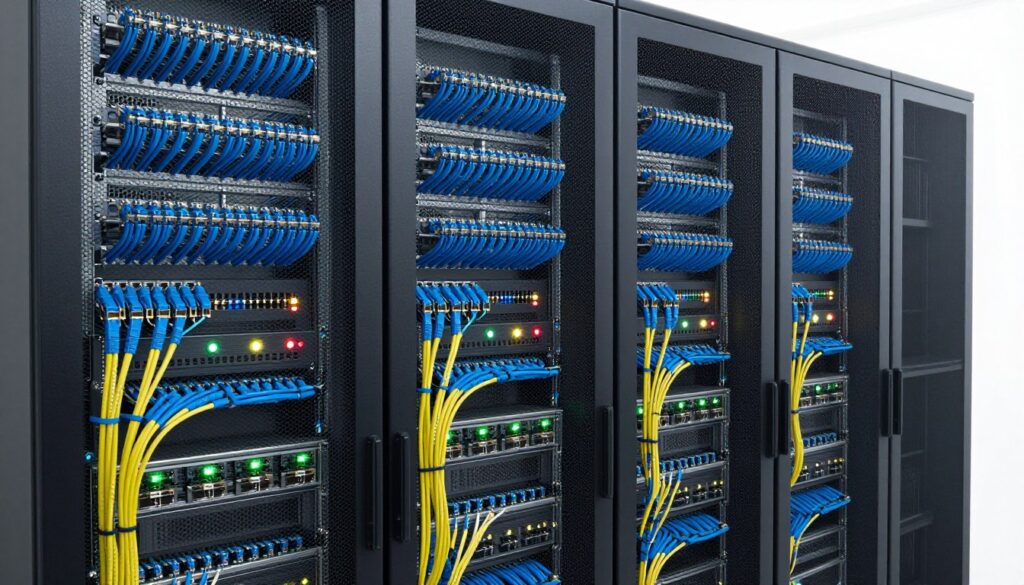
Structured cabling is a standardized approach to designing and installing the physical cabling that supports data, voice, wireless access points, security systems, and other connected devices. Instead of adding cables one by one whenever a need appears, the system is planned as a whole. That includes backbone cabling, horizontal cabling, patch panels, outlets, racks, labeling, and cable pathways.
In practical terms, this means your office is not relying on a mix of undocumented runs, improvised connections, and hardware placed wherever there was an empty corner. It means each workstation, meeting room, access point, IP phone, camera, and networked device connects through an organized infrastructure that can be managed and maintained efficiently.
That matters because office technology is no longer limited to desktops and phones. A single workplace may depend on VoIP, cloud applications, wireless coverage, visitor management, CCTV, access control, conference room systems, and shared devices across departments. All of those rely, directly or indirectly, on the quality of the underlying cabling.
Why businesses outgrow ad hoc cabling
Many offices start with acceptable connectivity and gradually lose control over it. A contractor adds a few lines during a renovation. Another vendor installs cameras. A network upgrade introduces new switches and access points. Before long, the business has multiple systems but no unified infrastructure strategy.
The result is often familiar. Network closets become crowded and hard to trace. Fault finding takes longer because nobody is fully sure where each cable starts and ends. Expansion becomes disruptive because the original layout did not anticipate growth. Even something simple, like moving a team to another area of the office, can turn into a rushed cabling job with avoidable downtime.
Structured cabling reduces those issues because it treats connectivity as business infrastructure, not as a series of separate purchases. That approach is especially valuable for offices planning expansion, relocation, floor reconfiguration, or technology refresh projects.
The business case for structured cabling for offices
The strongest reason to invest in structured cabling is operational stability. A well-planned cabling system supports consistent network performance, cleaner maintenance, and faster troubleshooting. Problems are easier to isolate. Changes are easier to execute. Your IT environment becomes easier to manage because the physical layer is no longer working against you.
There is also a financial case. Structured cabling can cost more upfront than a short-term patchwork approach, but the long-term savings are usually clearer once the office starts changing. Businesses often underestimate the cost of recurring small fixes, emergency callouts, and inefficient upgrade work caused by poor cable management and undocumented infrastructure.
It also supports stronger coordination across systems. Offices increasingly want one environment where networking, IP telephony, security cameras, access control, and wireless coverage work together. That is easier to achieve when the cabling is designed with those services in mind from the beginning.
What a well-designed office cabling system should include
A reliable office cabling design starts with the way your business actually operates. Desk count matters, but it is not the only factor. Meeting room usage, wireless density, printer locations, reception systems, surveillance coverage, and future headcount all affect the design.
At minimum, the system should account for workstation connectivity, backbone links between rooms or floors, equipment racks, patch panels, cable containment, labeling, and testing. In many cases, it should also support Power over Ethernet devices such as IP phones, wireless access points, and CCTV cameras.
The design should leave spare capacity. That is one of the most important decisions in any office project. Installing only for current demand can look cost-efficient on paper, but it tends to create constraints within a short period. Adding extra ports, capacity, or pathways during the initial installation is usually far less disruptive than retrofitting them after the office is occupied.
Documentation is just as important as the hardware itself. Clear labeling, test reports, and as-built records save time long after the installation is complete. Without them, even a technically sound system can become difficult to manage.
Choosing the right cabling standard and layout
Not every office needs the same specification. The right choice depends on network demands, building layout, budget, and future plans. For many office environments, Cat6 remains a practical option for supporting standard business networking needs. In higher-performance environments, or where future bandwidth requirements are expected to increase significantly, Cat6A or fiber may be a better fit.
This is where planning matters. Over-specifying everything can inflate project costs without delivering meaningful value. Under-specifying can limit the life of the installation and force another upgrade sooner than expected. The best approach is usually based on actual usage patterns, expected growth, and how long the business intends to stay in the space.
Office layout also affects design quality. Open-plan floors, executive rooms, collaborative zones, training rooms, and reception areas all place different demands on connectivity. A good design does not simply distribute ports evenly. It considers how people work, where devices are located, and how those spaces may change over time.
Common mistakes that create future headaches
One of the most common issues is treating cabling as the final item in a fit-out instead of an early infrastructure decision. When cabling is pushed late in the project, pathways may be limited, equipment room locations may be compromised, and installation quality can suffer under time pressure.
Another mistake is planning only for desks while ignoring the wider connected environment. Wireless access points, surveillance cameras, door controllers, conference room equipment, and digital displays all need proper support. If those systems are added later without a coordinated plan, the office ends up back in the same fragmented position it was trying to avoid.
Poor contractor coordination is another risk. Cabling, networking, and physical security often overlap in the same spaces and timelines. When multiple vendors work independently, conflicts are common. A systems integration approach helps avoid duplicate work, inconsistent standards, and delays caused by one trade affecting another.
Why installation quality matters as much as design
Even a strong design can underperform if installation standards are weak. Cable routing, bend radius, termination quality, rack organization, and testing all affect long-term reliability. Offices may not notice these issues immediately, but they often appear later as intermittent faults, unexplained performance problems, or maintenance difficulties.
That is why experience matters. A dependable implementation partner understands not only the technical standards but also the operational realities of working in active offices, coordinating with fit-out schedules, and minimizing disruption to staff. For businesses managing relocation, expansion, or multi-system upgrades, that practical execution is often what determines whether the project feels controlled or chaotic.
Providers with broader infrastructure experience can also plan more effectively across related systems. If your office is upgrading cabling alongside wireless, IP telephony, CCTV, or access control, a coordinated design reduces rework and helps the environment function as one connected system. This is where an established integrator such as I-Weblogic can add value by aligning connectivity and security requirements in a single implementation plan.
When it makes sense to upgrade
There is no single trigger, but certain signs are hard to ignore. If your office has recurring network issues, undocumented cable runs, limited spare capacity, or growing demands from wireless and security devices, the infrastructure may already be behind your business needs. The same applies if you are relocating, renovating, or reconfiguring teams.
An upgrade is also worth considering when your current setup makes simple changes too difficult. If every desk move requires troubleshooting, or every new device feels like a workaround, the problem is rarely just the endpoint. It is usually the structure behind it.
The best time to address structured cabling is before it becomes urgent. Businesses that plan early generally get better layouts, smoother implementation, and fewer surprises during handover.
That is the real value of structured cabling for offices—not just better cables, but a workplace that is easier to run, easier to grow, and better prepared for what comes next.


Pingback: Choosing a Keyless Entry System for Office - I-Weblogic Pte Ltd
Pingback: Data Communication Infrastructure Guide - I-Weblogic Pte Ltd
Pingback: Office Phone System Comparison for Business - I-Weblogic Pte Ltd
Pingback: 5 Essential Tips for Choosing Office Access Control Systems - I-Weblogic Pte Ltd