

When office calls drop during a client handoff or reception cannot transfer calls cleanly, the problem is rarely just the handset. A voip phone system for office environments depends on the full stack behind it – cabling, switching, internet stability, network design, and the way the business actually operates day to day. That is why choosing the right system is less about buying phones and more about building a communications setup that works reliably under real business conditions.
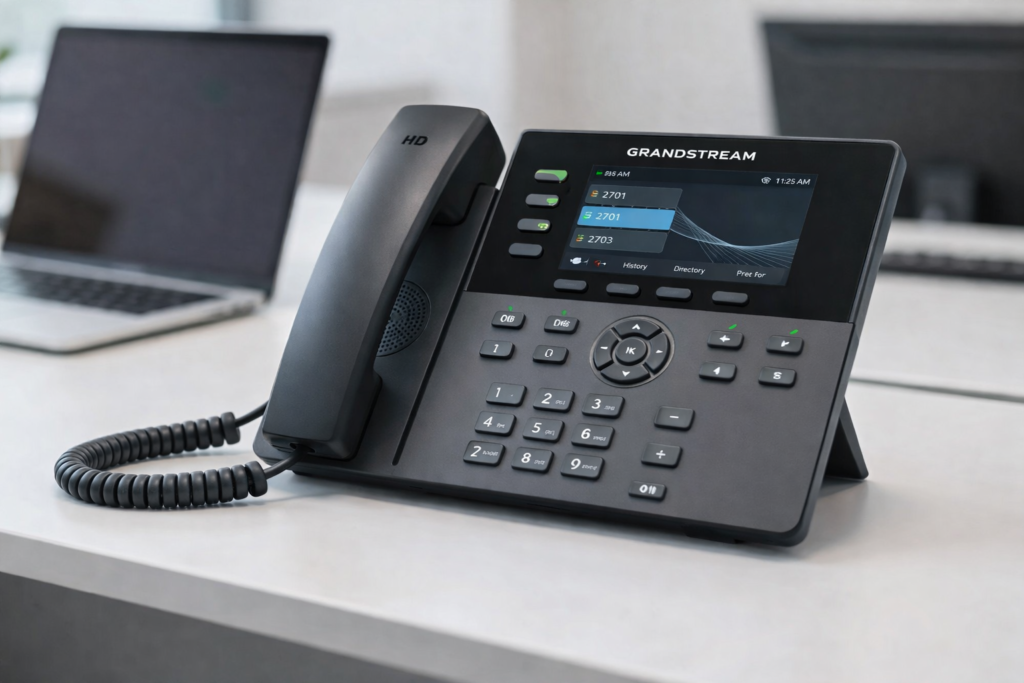
What a voip phone system for office environments actually needs
On paper, most VoIP platforms look similar. They offer extension dialing, call transfer, voicemail, auto attendants, and mobile apps. In practice, performance varies based on the office infrastructure supporting them.
A small office with ten users may do well with a straightforward hosted setup if the network is clean and the internet connection is stable. A larger office, multi-floor site, school campus, or multi-site business usually needs more planning. Call quality can suffer when voice traffic competes with video meetings, cloud applications, guest Wi-Fi, and unmanaged devices on the same network.
This is where many businesses underestimate the project. They compare monthly calling plans but do not assess switch capacity, PoE availability, VLAN configuration, structured cabling condition, firewall rules, or failover options. The result is a phone system that is technically installed but operationally frustrating.
Why businesses move away from traditional office phones
Legacy PBX systems still exist in many offices because they are familiar. They may also seem stable simply because everyone has learned to work around their limitations. But aging phone infrastructure tends to create hidden costs over time.
Moves, adds, and changes are slower. Expansion into a new floor or branch can require fresh hardware decisions instead of a simple extension rollout. Maintenance support becomes harder as older systems lose vendor attention. Features employees now expect, such as voicemail to email, softphones, call reporting, or flexible routing, may be limited or unavailable.
A modern VoIP deployment addresses those gaps, but the business case is not only about features. It is also about adaptability. If your office relocates, adds a remote team, opens another site, or changes call flows by department, a well-planned VoIP system can adjust without forcing a full communications rebuild.
The network is the phone system
This is the point many vendors gloss over. Voice runs on the network, so network quality directly affects call quality. If users complain about jitter, echo, delay, or one-way audio, the root cause often sits in the LAN or internet path rather than in the phone itself.
For office environments, switch quality matters. Power over Ethernet simplifies deployment and reduces desk-level power adapters, but only if the switching environment is sized correctly. Structured cabling matters too. Poor terminations, aging patch panels, and inconsistent labeling create avoidable support issues, especially during office moves or departmental changes.
Wireless can support some voice use cases, but desk phones and fixed office endpoints generally perform best on properly designed wired infrastructure. If a business wants cordless flexibility, that should be planned intentionally, not improvised through overloaded Wi-Fi.
Traffic prioritization is another practical issue. Voice should not be treated the same as general data traffic. Quality of Service settings, sensible segmentation, and stable uplink performance can make the difference between clear conversations and daily complaints.
How to evaluate a voip phone system for office operations
The right choice depends less on brand names alone and more on fit. A front-office heavy business will have different needs from a back-office administrative site, a school, or a retail operation with multiple branches.
Start with call flow. How are inbound calls handled today, and where are the delays? Many businesses need better auto attendant design, hunt groups, overflow routing, and after-hours handling more than they need advanced calling features.
Next, look at user types. Executives, reception teams, customer service staff, warehouse leads, and hybrid employees all use the system differently. Some need desk phones, some need mobile apps, and some need both. A one-size-fits-all hardware plan usually creates unnecessary cost.
Then consider scalability. If the office expects headcount growth, floor expansion, or another location within the next 12 to 24 months, the system should be designed with that horizon in mind. It is cheaper to plan switching, cabling capacity, and extension structure early than to retrofit under pressure later.
Security should also be part of the decision. VoIP is part of the IT environment, so it should be considered alongside firewall policy, endpoint management, access control, and network segmentation. A communications platform that is easy to use but poorly secured creates a different kind of operational risk.
Hosted, on-premises, or hybrid?
There is no single right answer here. Hosted VoIP works well for many offices because it reduces on-site telephony hardware and makes multi-site connectivity easier. It can also simplify support for hybrid teams who need access from laptops and mobile devices.
On-premises systems may still make sense in some environments, especially where there are strict control requirements, site-specific integration needs, or legacy workflows tied to local infrastructure. Hybrid models can be useful when a business wants some local resilience while still using cloud-based management or distributed calling features.
The trade-off usually comes down to control, complexity, and support model. Hosted systems can be fast to deploy, but they still depend on strong local infrastructure. On-premises systems provide more direct control, but they place more responsibility on local management and maintenance. Hybrid can offer balance, though it may introduce more design decisions up front.
Integration matters more than most buyers expect
A phone system should not sit apart from the rest of the office environment. In many businesses, communications, networking, cabling, and physical infrastructure affect one another every day.
For example, an office relocation often combines new desk layouts, fresh cabling runs, switch upgrades, access control adjustments, and revised reception workflows. Treating telephony as a standalone purchase can create project delays and handoff problems between vendors.
The better approach is coordinated implementation. If the same project also involves network refresh, structured cabling, wireless improvements, or security systems, planning those dependencies together reduces disruption. This is especially valuable for growing businesses and multi-site environments where downtime is expensive and internal teams are already stretched.
That integrated approach is where experienced implementation partners add real value. Companies such as I-Weblogic typically see the broader picture because telephony is only one part of the business infrastructure stack.
Common mistakes that lead to poor results
The most common mistake is choosing based on handset cost or monthly subscription price alone. Low upfront pricing can look attractive until the office discovers it needs switch replacement, cabling remediation, better internet resiliency, or additional configuration work to make the system usable.
Another mistake is skipping a site assessment. If nobody checks rack condition, patching standards, PoE availability, or internet performance before rollout, surprises tend to appear during installation rather than during planning.
There is also a people issue. Businesses sometimes focus on technical deployment and forget call handling design, user training, and reception workflows. Even a good system will feel inefficient if staff are unclear on transfers, groups, voicemail settings, or mobile usage policies.
Finally, some organizations under-plan for resilience. If internet service drops, what happens to inbound calls? If a switch fails, who is affected? If one office loses connectivity, can another team pick up calls? These questions matter more than feature checklists once the system is live.
What a good deployment looks like
A good VoIP project starts with discovery, not product pushing. The business should understand current pain points, future requirements, user profiles, and infrastructure readiness before making design decisions.
From there, the deployment should cover the full environment: cabling where needed, switching and PoE capacity, network segmentation, internet assessment, phone provisioning, call flow setup, testing, and user onboarding. If multiple sites are involved, rollout sequencing matters. If the business cannot tolerate downtime during business hours, cutover planning matters just as much.
The best result is not a phone system with the longest feature list. It is a system employees use confidently, customers can reach reliably, and managers do not have to troubleshoot every week.
If you are evaluating a voip phone system for office use, ask a simple question before comparing brands or pricing: is your office infrastructure ready to support it properly? That question usually leads to a better decision, fewer surprises, and a communications setup that holds up as the business grows.


Pingback: Office Phone System Comparison for Business - I-Weblogic Pte Ltd